Have you tried Open AL? It's not as loud, supports up to 128 sound sources, better positioning (read – true binaural stereo), and overall clearer.
I think there still is that "too loud multikill" effect but less pronounced
D3D11 moiré effect
-
HeadShotUT
- Posts: 45
- Joined: Thu Dec 30, 2021 8:57 pm
- Has thanked: 17 times
- Been thanked: 2 times
Re: D3D11 moiré effect
That's awesome foundling. I never had such problems because I used 469 mostly on Windows XP.OVH wrote: Mon Sep 14, 2026 7:33 pmThats what I use in v436 and v469. But in v469 its not working the same. The hit sounds are too loud way too loud specially if you hit several monsters at the same time like pupaes for example.HeadShotUT wrote: Thu Aug 27, 2026 8:47 am pure DirectSound3D out of Galaxy render is the best ever.
And the game sounds MUST have priority over hit sounds and announcer sound like in v436. Obviously.
My settings was unusual because I let Creative X-Fi sound render using MacroFX and Smart Volume Master alongside game mode CMSS-3D from DirectSound3D when EAX PurePath and Environment FlexiFX do the job.
Elevation filter and EAX effects was so real, no match to OpenAL in any kind.
@aphex
The X-Fi audio processor natively handles 128 3D audio voices/sources so everything is mixed on the fly without CPU.
So o let 128 limit in Galaxy audio render.
Re: D3D11 moiré effect
I have v436 and v469e on the same PC. Both versions are using strictly the same settings for audio. I repeat: exact same settings.HeadShotUT wrote: Tue Sep 15, 2026 1:01 pmThat's awesome foundling. I never had such problems because I used 469 mostly on Windows XP.OVH wrote: Mon Sep 14, 2026 7:33 pmThats what I use in v436 and v469. But in v469 its not working the same. The hit sounds are too loud way too loud specially if you hit several monsters at the same time like pupaes for example.HeadShotUT wrote: Thu Aug 27, 2026 8:47 am pure DirectSound3D out of Galaxy render is the best ever.
And the game sounds MUST have priority over hit sounds and announcer sound like in v436. Obviously.
Example: with v436 when you taunt at the same time you hear the announcer then the announce sound volume is reduced by the taunt and you can hear both sounds at the same time. The taunt is more important than the announcer because its a game sound. Its important in team games like CTF. Game sounds MUST have the priority.
In v469e when you do the same nothing change. The announcer volume is NOT reduced and you dont hear the taunt at the same time. The announcer is taking over any new sound. This is NOT normal. Bad priority bad volume balance.
The people who made original UT have really thought about every thing. Geniuses.
The people who tinkered the sound in v469 did it badly and they should have never touched the volumes. Hit sounds are so loud that I have to decrease the volume with the multimedia keys when I kill several monsters at the same time. I dont need to do that with v436.
They claim sound quality is better in v469 but its not. Quality is first about volumes and balance between different sounds specially in a game. Thats what is important before being crystal clear or 3D or whatever else.
Re: D3D11 moiré effect
It might sound weird, but I think I resolved the issue you talk about by...decreasing number of sound channels to default 16.
Possibly perceived loudness is caused by same sound playing at once from too many channels (too many monsters making same sound).
Try with both Open AL and Galaxy
Possibly perceived loudness is caused by same sound playing at once from too many channels (too many monsters making same sound).
Try with both Open AL and Galaxy
- Attachments
-
- openal16.png (39.09 KiB) Viewed 446256 times
Re: D3D11 moiré effect
Thats what I had before you suggested me to increase it to 32. So no change with 16 or 32 channels problems are the same.Aphex wrote: Thu Sep 17, 2026 11:14 am I think I resolved the issue you talk about by...decreasing number of sound channels to default 16.
Even the heal gun of tanks (blue pulse) has a strange sound compared to v436. Its not a problem of settings its a v469 problem.
-
HeadShotUT
- Posts: 45
- Joined: Thu Dec 30, 2021 8:57 pm
- Has thanked: 17 times
- Been thanked: 2 times
Re: D3D11 moiré effect
I don't have a setup for made AB test right now but as far I know there is massive changes in 469 and Galaxy audio is buggy on Windows Vista and newer, OpenAL could help there.OVH wrote: Wed Sep 16, 2026 10:57 pmI have v436 and v469e on the same PC. Both versions are using strictly the same settings for audio. I repeat: exact same settings.HeadShotUT wrote: Tue Sep 15, 2026 1:01 pmThat's awesome foundling. I never had such problems because I used 469 mostly on Windows XP.OVH wrote: Mon Sep 14, 2026 7:33 pm
Thats what I use in v436 and v469. But in v469 its not working the same. The hit sounds are too loud way too loud specially if you hit several monsters at the same time like pupaes for example.
And the game sounds MUST have priority over hit sounds and announcer sound like in v436. Obviously.
Example: with v436 when you taunt at the same time you hear the announcer then the announce sound volume is reduced by the taunt and you can hear both sounds at the same time. The taunt is more important than the announcer because its a game sound. Its important in team games like CTF. Game sounds MUST have the priority.
In v469e when you do the same nothing change. The announcer volume is NOT reduced and you dont hear the taunt at the same time. The announcer is taking over any new sound. This is NOT normal. Bad priority bad volume balance.
The people who made original UT have really thought about every thing. Geniuses.
The people who tinkered the sound in v469 did it badly and they should have never touched the volumes. Hit sounds are so loud that I have to decrease the volume with the multimedia keys when I kill several monsters at the same time. I dont need to do that with v436.
They claim sound quality is better in v469 but its not. Quality is first about volumes and balance between different sounds specially in a game. Thats what is important before being crystal clear or 3D or whatever else.
Re: D3D11 moiré effect
Its not spectacular. Maybe hit sounds are a bit lower but the sounds priority and attenuation still dont work.
I will do more tests with maps I know well.
Re: D3D11 moiré effect
OpenAL is strange. The general balance of volumes of sounds is better but the stereo is strange its not natural like Galaxy. Some sounds are missing like they are "eaten" by other sounds. Sometimes even the hit sounds are missing.
The priority is worse than Galaxy. When mass killing you can hear some sounds being cut by the new sounds. Maybe thats why some sounds are missing.
And it does not attenuate the announcer voice in favor of the game sounds like in v436. The announcer voice stay in front and you dont hear the game sounds.
Thats with 64 channels (the default value for OpenAL) and also 16 channels.
I also tried with the Galaxy and OpenAL versions from the Windows XP build and its the same.
IMO the devs should just restore the Galaxy sound engine from v436 which is near perfect.
The priority is worse than Galaxy. When mass killing you can hear some sounds being cut by the new sounds. Maybe thats why some sounds are missing.
And it does not attenuate the announcer voice in favor of the game sounds like in v436. The announcer voice stay in front and you dont hear the game sounds.
Thats with 64 channels (the default value for OpenAL) and also 16 channels.
I also tried with the Galaxy and OpenAL versions from the Windows XP build and its the same.
IMO the devs should just restore the Galaxy sound engine from v436 which is near perfect.
Re: D3D11 moiré effect
In what way is it strange? It's got real binaural audio (like if your head was in game).
I use this feature with 2 speakers, and hear sounds behind me when they come from behind me in game. But I had to align speakers in some specific way (like this)
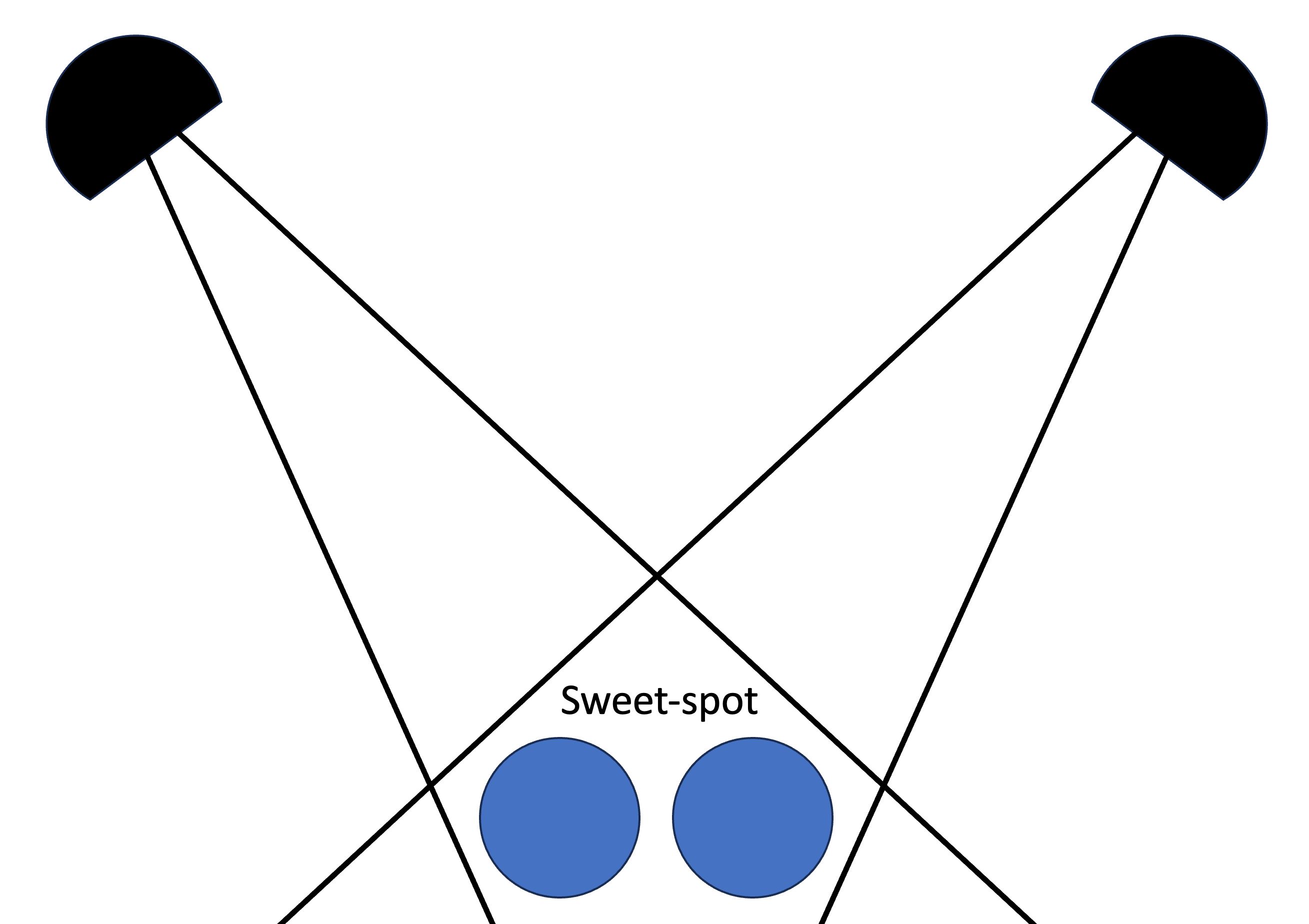
Galaxy doesn't have this unless EAX/A3D is used (only supported in older builds (broken in new updates), and only on specific cards/wrappers)
Or maybe you haven't yet played games with HRTF, and it feels unusual? In this case, you can always set use of HRTF to "False" ("Auto" is usually "Enabled")
Have you tried 128?OVH wrote: Tue Sep 22, 2026 2:43 pm Thats with 64 channels (the default value for OpenAL) and also 16 channels.
I've also noticed, that in older UT, "High" sound quality is Rate 22050. Maybe this will remove that "strange" feel?
Also attaching my 432 Galaxy DLL just in case, which I just successfully tested with 469E "xp-x86" build, on Windows XP machine with full EAX support.
This version supports up to 32 channels (33 and more will crash), but high Rates should work
*Make copy of both Galaxy.dll AND UnrealTournament.ini just in case
I see now why you like Galaxy so much. It's got much more "oomph", compared to "crystal-clear" and "sterile" (albeit precise) Open AL.
- Attachments
-
- Galaxy432.zip
- (108.78 KiB) Downloaded 168 times
Last edited by Aphex on Wed Sep 23, 2026 8:01 pm, edited 5 times in total.
-
HeadShotUT
- Posts: 45
- Joined: Thu Dec 30, 2021 8:57 pm
- Has thanked: 17 times
- Been thanked: 2 times
Re: D3D11 moiré effect
What sound card do You have?OVH wrote: Tue Sep 22, 2026 2:43 pm IMO the devs should just restore the Galaxy sound engine from v436 which is near perfect.